Paging & Virtual Memory Explained: How Your OS works with limited RAM

I'm Mihir, a Full-Stack Web Developer and open-source enthusiast currently pursuing my sophomore year at RIT
Introduction
Have you ever wondered how your system can run dozens of browser tabs, an IDE, music playback, background services, and even Docker containers—all on 8 GB or 16 GB of RAM?
It can seem like the machine is doing more than the hardware should allow.
What you’re seeing is virtual memory—one of the most important, and often misunderstood, abstractions in operating systems. Virtual memory isn’t a performance trick or a hardware shortcut. It’s a deliberate design that trades direct access for indirection, and raw speed for scalability and isolation.
This article explains paging and virtual memory from a modern, practical perspective, aimed at CS students and early-career software engineers. We’ll build intuition alongside the theory, examine why these design choices exist, and clarify what actually constrains system performance in real workloads.
The Core Problem: Why Direct Memory Access Failed
Early systems allowed programs to directly access physical memory addresses. While simple, this approach collapses immediately in multi-program environments.
1. Security and Stability Break Down
If multiple programs share the same address space:
One program can overwrite another’s memory
Bugs become system crashes
Malicious code gains trivial access to sensitive data
Early operating systems (e.g., Windows ≤ 3.11) lacked real memory protection. Even later systems like Windows 95/98 enforced it weakly—one faulty application could bring down the entire OS.
2. External Fragmentation Wastes Memory
Programs required contiguous blocks of RAM.
Example:
RAM = 1 GB
Loaded programs: 200 MB, 300 MB, 250 MB
Free space left = fragmented “holes”
Even with 474 MB free, a new 350 MB program may fail to load because no single contiguous block exists.
This is external fragmentation—memory looks like Swiss cheese.
3. RAM Is Finite (and Always Will Be)
32-bit systems capped at 4 GB
Modern software grows faster than RAM capacities
Even 16 GB systems can exhaust memory under heavy workloads
4. Duplicate Code Wastes Space
Shared libraries (e.g., C standard libraries) were loaded once per process, duplicating identical code in RAM.
5. Entire Programs Had to Be Loaded
Programs could not start unless fully resident in memory. Large applications were locked out even if only small parts were needed initially.
Virtual Memory: The Foundational Idea
Virtual memory introduces a crucial abstraction:
Each process gets the illusion of a large, private, contiguous memory space—while the OS manages the physical reality underneath.
Programs no longer see physical addresses. Instead, they use virtual addresses, which the operating system transparently maps to real RAM or disk.
What Virtual Memory Solves
Isolation & Security: Each process gets a private virtual address space enforced by hardware/OS, preventing accidental or malicious memory access across processes. Sharing is only via explicit, controlled mechanisms.
Non-Contiguous Allocation: Processes see a contiguous address space even though their pages are scattered in physical RAM, eliminating external fragmentation and avoiding costly memory compaction.
Efficient Multitasking: Only actively used pages need to be in RAM; idle pages can be swapped out, enabling fast context switches and better system responsiveness.
Scalability Beyond RAM: Processes can allocate more memory than physical RAM, with performance driven by locality and working set size rather than total allocation.
Paging: The Mechanism That Makes It Practical
Virtual memory is implemented primarily through paging, which gives the OS fine-grained control over memory placement, protection, and movement.
Paging Basics
Virtual memory is divided into fixed-size pages
Physical memory (RAM) is divided into equally sized frames
Page size is typically 4 KB (other sizes exist: 2 MB, 1 GB huge pages)
Pages can be placed into any available frame in RAM
Because pages do not need to be contiguous in physical memory, external fragmentation is eliminated entirely.
Virtual Address vs Physical Address
When a program runs, it never deals with physical addresses.
It generates virtual (logical) addresses.
A virtual address is split into two parts:
| Page Number | Offset |
Page Number: identifies which virtual page is being referenced
Offset: identifies the exact byte within that page
Example (4 KB pages):
Page size = 4096 bytes = 2¹²
Offset = lower 12 bits
Upper bits = page number
The Page Table: The Translation Map
Each process has its own page table.
The page table maps:
Virtual Page Number → Physical Frame Number
Each page table entry (PTE) typically contains:
Physical frame number
Present / valid bit
Read/write/execute permissions
Accessed and dirty bits (for replacement decisions)
Address Translation: Step-by-Step

The diagram shows the complete logical → physical address translation pipeline used in a paging-based virtual memory system.
We will follow the flow left to right, exactly as the hardware does.
Step 1: CPU Generates a Logical (Virtual) Address
When the CPU executes an instruction that accesses memory (e.g., load, store, instruction fetch), it produces a logical address.
In the diagram, this logical address is split into:
| p | d |
Where:
p (page number): identifies which virtual page is being accessed
d (offset / displacement): identifies which byte inside that page
Step 2: MMU Intercepts the Logical Address
The logical address does not go directly to memory.
Instead, it is intercepted by the Memory Management Unit (MMU), a dedicated hardware component inside the CPU.
The MMU’s responsibilities:
Address translation
Permission checking
Triggering page faults
At this point:
The MMU separates the address into
panddThe offset
dis preserved unchangedOnly the page number
pmust be translated
Step 3: Page Number Used to Index the Page Table
The MMU now needs to find where virtual page p resides in physical memory.
Page Table Lookup
Each process has its own page table
The base address of the current process’s page table is stored in a special CPU register
The MMU uses
pas an index into this table
From the diagram:
p ──▶ page table ──▶ f
This lookup retrieves a Page Table Entry (PTE).
Step 4: Page Table Entry (PTE) Inspection
The PTE contains critical metadata, including:
f (frame number) → where the page resides in physical memory
Present/Valid bit
Access permissions (R/W/X)
Status bits (accessed, dirty)
MMU Checks the Present Bit
Case 1: Page Is Present (Valid = 1)
The page is already loaded in RAM
The PTE contains a valid frame number
fTranslation continues immediately
Case 2: Page Is Not Present (Valid = 0)
The page is not in RAM
A page fault is triggered
Control transfers to the OS kernel
(Disk I/O may occur; execution pauses)
The diagram assumes the present case, which is why translation proceeds.
Step 5: Physical Address Construction
Once the frame number f is known, the MMU constructs the physical address.
Critical Rule
The offset
dis copied unchanged.
The physical address format becomes:
| f | d |
This is shown explicitly in the diagram:
Logical address:
| p | d |Physical address:
| f | d |
Why This Works
Pages and frames are the same size
Offset always refers to the same byte position
Only the page/frame identity changes
Step 6: Accessing Physical Memory
The completed physical address is now placed on the memory bus.
From the diagram:
Physical memory is divided into frames
Frame boundaries are clearly visible
The address range:
  f0000...0000
  to
  f1111...1111
corresponds to the frame
f
The memory hardware:
Uses the physical address
Retrieves or writes the requested data
Sends the data back to the CPU
The instruction completes normally.
Step 7: Where the TLB Fits In (Performance Optimization)
The diagram omits the TLB for simplicity, but real systems check the TLB first.
Real Execution Order (More Accurate)
CPU generates logical address
MMU checks TLB
Hit → frame number obtained instantly
Miss → page table lookup required
PTE retrieved (if present)
Physical address constructed
Memory accessed
Why This Matters
Page table lookups involve memory access
Without a TLB, every instruction could require multiple memory accesses
TLBs reduce translation to a few CPU cycles
Internal Fragmentation (The Trade-Off)
Paging trades external fragmentation for internal fragmentation.
Example:
Page size = 4 KB
Program needs 6 KB
Allocated: 2 pages = 8 KB
Wasted: ~2 KB
Page Faults and Demand Paging: The Core Idea
Fundamental Observation
When an application is installed, it resides on disk, not in RAM.
When the application starts running, it is not necessary—and not feasible—to load the entire application into RAM upfront.
Modern systems exploit this fact.
Instead of loading everything:
Only what is needed right now is loaded
The rest stays on disk
Additional parts are loaded on demand
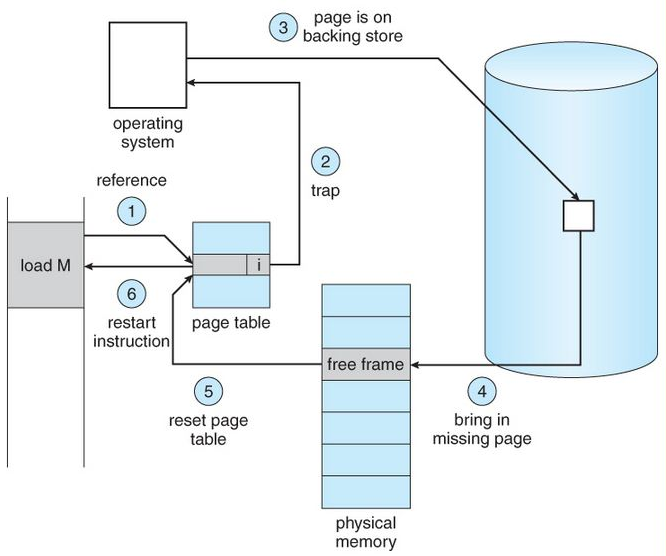
This strategy is called demand paging, and the mechanism that drives it is the page fault.
What Is Demand Paging?
Demand Paging means:
Pages are brought into RAM only when they are actually accessed
Unused parts of the program never consume RAM
Key Implication
RAM is treated as a working cache, not as a full mirror of a process’s address space.
This is why:
Large applications start quickly
Memory usage grows gradually
Multiple large processes can coexist
Virtual Memory Layout (Disk vs RAM)
For a running process:
Virtual address space: Large, continuous, per-process illusion
Physical RAM: Limited, shared resource
Disk (executable + swap space): Holds the full backing store
Most pages of a process exist in one of three states:
In RAM (resident)
On disk (backing store)
Not yet allocated (but addressable)
What Is a Page Fault?
A page fault occurs when:
A process accesses a virtual page
That page is not currently present in RAM
This is not an error condition by default.
A page fault is a controlled, intentional mechanism that allows demand paging to work.
Page Fault Handling: Step-by-Step Control Flow
1. MMU Detects a Missing Page
CPU issues a memory access
MMU consults the page table
Present bit = 0
➡️ Page fault is raised
2. CPU Traps into the OS Kernel
Hardware triggers a page fault exception
Execution switches to kernel mode
The faulting instruction is paused (not discarded)
3. OS Validates the Access
The OS checks:
- Is this address part of the process’s valid virtual address space?
Invalid access
Example: dereferencing a wild pointer
Result: segmentation fault
Valid access
Page exists logically, just not in RAM
Continue handling
4. OS Locates the Page on Disk
The OS determines where the page lives:
Executable file (code, static data)
Swap space (previously evicted pages)
5. Find a Free Frame (or Make One)
If RAM has a free frame:
- Use it
If RAM is full:
Evict an existing page
This requires a page replacement algorithm
Dirty pages are written back to disk
6. Load the Page into RAM
Disk → RAM transfer (slow operation)
Page is placed into the selected frame
7. Update the Page Table
Frame number recorded
Present bit set
Metadata updated (permissions, accessed bit)
8. Restart the Faulting Instruction
CPU retries the instruction
This time, translation succeeds
Execution continues as if nothing happened
From the program’s perspective, the page was always there.
Swap Space: Enabling Illusion of Large Memory
Swap space is disk storage reserved to:
Hold pages evicted from RAM
Extend the apparent memory capacity
Important:
Swap does not replace RAM
It acts as a backing store
RAM remains the performance-critical tier.
Virtual Memory Does Not Remove Limits
Virtual memory redefines the limit, it does not eliminate it.
The true constraint is not:
- Total virtual address space
But:
- The working set
The Working Set: The Real Bottleneck
Working set =
Pages a process actively uses during a recent time window.
If the working set fits in RAM:
Few page faults
High performance
If it doesn’t:
Frequent evictions
Page faults spike
System slows dramatically
Example
RAM: 8 GB
7 processes
Each has 2 GB virtual address space
Each actively uses 200 MB
Total active memory:
7 × 200 MB = 1.4 GB
Everything fits comfortably.
Remaining pages exist only as:
Page table entries
Disk-backed pages
Why This Usually Works: Locality of Reference
Demand paging succeeds because programs exhibit locality.
Temporal Locality
- Recently used pages are likely to be reused
Spatial Locality
- Accessing one address implies nearby addresses will be accessed
Paging and replacement strategies are built on these statistical properties.
When Virtual Memory Breaks: Thrashing
Thrashing occurs when:
Active working sets exceed RAM
OS constantly evicts pages that are immediately needed again
Symptoms:
Page fault rate explodes
Disk I/O dominates
CPU mostly waits idle
At this point:
Virtual memory cannot help
Performance collapses because disk latency dominates
Page Replacement Algorithms: Choosing a Page to evict
When physical memory is full and a page fault occurs, the operating system must select a resident page to evict to make room for the incoming page. This decision directly impacts performance: a poor choice increases future page faults, while a good one preserves locality. Conceptually, this is the same problem as cache eviction, but at a much larger cost.
FIFO (First-In, First-Out)
Evicts the page that has been in memory the longest, regardless of how often or how recently it has been accessed.
Strengths: Very simple to implement; minimal bookkeeping.
Weaknesses: Completely ignores locality and access frequency.
Pathology: Can exhibit Belady’s anomaly, where adding more memory increases the number of page faults.
Usefulness: Primarily educational; rarely used in real systems.
LRU (Least Recently Used)
Evicts the page that has not been accessed for the longest time, based on the assumption that pages used recently are likely to be used again.
Strengths: Closely matches temporal locality; performs well in practice.
Weaknesses: Exact LRU requires tracking every memory access, which is expensive or impractical in hardware.
Reality: Real systems use approximations (e.g., reference bits, clock algorithms) rather than true LRU.
Optimal (MIN) — Theoretical Baseline
Evicts the page whose next access is farthest in the future.
Strengths: Provably minimizes page faults.
Weaknesses: Requires perfect knowledge of future memory accesses, which is impossible.
Usefulness: Serves as a gold standard for evaluating real algorithms in simulations and analysis.
Conclusion
Virtual memory is a disciplined abstraction that changes how memory is used, shared, and protected. By separating virtual addresses from physical RAM, the OS enforces isolation, avoids fragmentation, and lets programs grow beyond physical memory—as long as their working sets fit. In the end, performance isn’t about how much memory you allocate, but how locally and predictably you access it. Once you think of RAM as a cache for active pages rather than a container for entire programs, virtual memory stops feeling magical and starts feeling like a clean, elegant trade-off.


